A template lays out a screen for a known shape of data. It is a starting point rather than a limit, and an empty canvas is equally valid.
Result and contract
- Template
- Analytics dashboard
- Selected
App Studio
Start from a template, bind components to fields on the API products you already publish, run the publish checks, and install versioned applications per customer with their own branding — without writing application code. An add-on to Cloud and Enterprise.
A team publishes an analytics dashboard over its Customer360 API product, then installs it for three customers, each with its own branding.
App Studio
Template, bind, check, install — the four steps between a published API product and a branded application running for a specific customer.
Select a step to see what it produces.
A template lays out a screen for a known shape of data. It is a starting point rather than a limit, and an empty canvas is equally valid.
Result and contract
Components bind to fields on a published API product rather than to a source system, so an application cannot reach past the contract's policy or tenant scope.
Result and contract
The publish checks run before a version is released, and building, approving, and installing stay separate responsibilities.
Result and contract
Installations are versioned per customer with their own branding, a fleet view shows usage across them, and an installation can be rolled back.
Result and contract
Guided explanation
The customer problem
Business teams need an interface over unified data, and hand-building one for every customer and every brand does not scale.
The better operating model
App Studio is a visual builder over the API products you already publish. Start from a template, bind components to API fields on a canvas, run the publish checks, then install versioned apps per customer with their own branding.
The solution approach
Start from a template, bind components to the API products you already publish, then publish and install per customer.
Conceptual architecture
Sixteen components cover KPIs, charts, tables, filters, and drawers, each bound to fields on an API product.
Publish checks review specification conformance, accessibility, and PII masking before release.
Separation of duties keeps building, approving, and installing distinct responsibilities.
Installations are versioned per customer with branding and rollback, and a fleet view shows usage across them.
Every call goes through the Apyrn One gateway with tenant scope and audit.
Enterprise examples
A team publishes an analytics dashboard over its Customer360 API product.
An operator installs the same application for three customers, each with its own branding.
An administrator rolls one installation back to its previous version.
What this enables
Put an interface over unified data without building and maintaining a separate application.
Keep every application call inside the same gateway, tenant scope, and audit trail as the API products.
Ship per-customer versions with branding and rollback instead of one shared build.
Scope and qualification
App Studio is an add-on to Apyrn One Cloud and Apyrn One Enterprise, not a standalone product.
Applications read and write only through API products the publishing team already governs.
Why it exists
Once Apyrn One publishes a governed API product, the interface over it is the remaining work — and hand-building one for every customer and every brand does not scale. App Studio builds that interface from the API product itself.
How a build goes
Pick a template that already lays out the screen for a known shape of data, then change what you need.
Drag a component onto the canvas and bind it to a field on a published API product. The binding is to the contract, never to a source system directly.
Specification conformance, accessibility, and PII masking are checked before release, with building, approving, and installing kept as separate responsibilities.
Install a specific version for a specific customer with their branding, and roll an installation back when you need to.
Sixteen components
Single-value tiles bound to a field or an aggregate on the API product.
Series and categorical charts over the records the API product returns.
Record lists with the columns you choose from the contract's fields.
Controls that narrow what the other components on the page are showing.
Detail panels that open a single record without leaving the page.
On the canvas
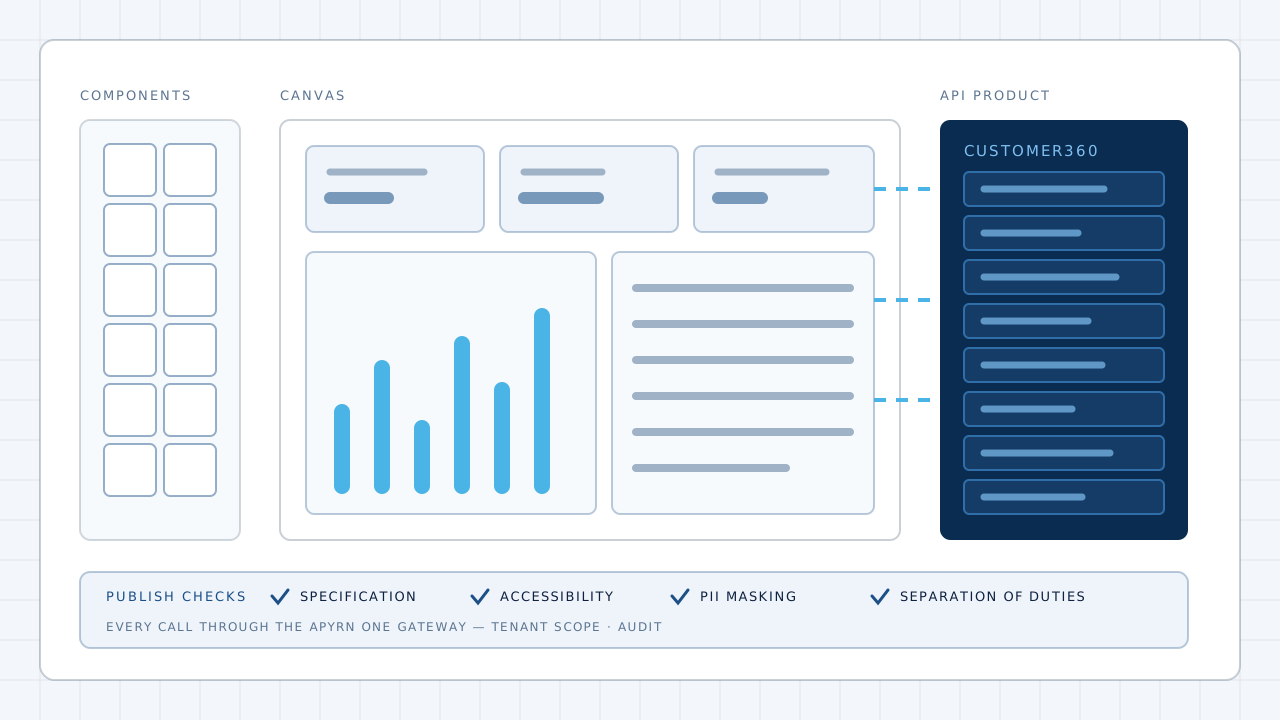
Components bind to fields on a published API product rather than to a source system, so an application cannot reach past the contract's policy, tenant scope, or audit. The publish checks run before a version is released.
Governance
Application calls go through the Apyrn One gateway with tenant scope and audit, exactly like any other consumer of the API product.
Building an application, approving it, and installing it for a customer are distinct responsibilities rather than one permission.
The publish checks look for personal data exposed on a surface that should not carry it, before the application is released.
See which customers are on which version and how the installations are being used.
App Studio is an add-on to Apyrn One Cloud and Apyrn One Enterprise. Browse the templates, or talk to us about your own.